

Proxy Firewall is a network security system that inspects, analyzes, and filters packets at the application layer. This help in protecting threat from malicious network traffic that comes in and out of the system.
Quick Preview show
Proxy Firewall is a system serving as network security to shield and guard resources or packets at the application level. With how network security has been another challenging factor that can make working online frustrating.
A Proxy firewall serves the core purpose of a proxy server and goes beyond encrypting packets as it decrypts it also. It filters and analyzes, and caches to reduce network bandwidth use. Having its internet protocol (IP), address makes it deprive of any malicious cyber-attack. This is because it does not connect the network directly or let networks connect directly to each other. Hence it safeguards the internal system from the outer one.
As technological advancement comes, there is an upgrade in the traditional way of using firewalls. Before now, a firewall could not examine or filter packets that pass through it, and it could not decrypt and have no network security. It uses an Intrusion Prevention System (IPS) or antivirus to guard against cyber threats and any form of its kind. However, a proxy firewall has changed how this work to be better by filtering out unauthorized network messages and communication. It inspects and detects threats from viruses and levels up privacy and anonymity.
Benefits of Proxy Firewall

The benefit of a proxy firewall gets down on several attributes. It can help you on different grounds depending on why you need it in the first place. A proxy firewall is integral knowing it is the more secure type of firewall on the application layer. With that said, an essential benefit of a proxy firewall is that, it serves as a shield between authorized and unauthorized users. They filter packets that come in and out of a network to ensure the undesirable ones are kicked out. It gives you the privilege of private access to the internet. With its cache features, it helps save network bandwidth.
Since it has its IP address, it does not allow direct contact with an external network. As such, It gives access to bosses in an organization to place a restriction ban on their employees’ free access to distracting sites during working hours. A Proxy firewall can detect incoming threats. It is so because not all the systems are directly connected to the public server of the internet. One system serves as the hub which others get the gateway from.
Pros of Proxy Firewall

The pros of a proxy firewall tell you more about its advantage, like what it is you are going to gain using a proxy firewall. Let’s see what it entails here.
- Security
Security is the top priority when it comes to using a proxy firewall. Knowing it has its internet protocol (IP), it disallowed direct contact with an external network. Unauthorized users are denied access to an authorized packet coming into the network. Additionally, there are several firewalls, but a proxy firewall is considered the most security guarded compared to others. validation of the user is what set its security above other firewalls.
- Assessment of Threat
Assessing threats is another major advantage of a proxy firewall. In this world of the internet that has got everyone by its wrist, a malicious threat from cyber-attackers poses a stand daily. If you are aware of the packet coming in and out of the site you want to visit will threaten your system, you won’t want to go that lane anyway.
So, instead, cyber attackers or criminals dive the other way around by coming clean strategically and making you fill in your personal and system details to enable them to hijack you completely. However, this is where a proxy firewall is needed, a proxy firewall often assesses the packets, messages, and communication that transpire within its network. It filters it off by detecting any threat and making sure to deny any unwanted access. It uses Deep Packet Inspection (DPI) and proxy-based architectures.
- Logging competency
The uniqueness of any logging details is that it is an authority of its own. It is highly considered in terms of your network security; thus, it’s an important asset to administrators. Since a proxy firewall comes with a personal IP address, your logging details are not visible to third-party. It inspects the entire network and not just the port number of the location address. This in turn safeguards your network and prevents it from any unauthorized logging.
- Improve performance
Proxy firewall also improves performance, and how is this possible? Every proxy firewall is serving the purpose of a proxy server and one of the interesting advantages of this proxy is the cache. With the cache, fast and easy website content can be accessed. When this happens, not only is the performance going to be different knowing it has accessed the said platform previously, network bandwidth will as well be saved.
- Control and Granular
Being able to control the function you perform is one good thing about using a proxy firewall. As an administrator, you will enjoy access to controlling what network traffic that comes in and out of your setup. Secured permission is given to access resources. You can set up its security level to be in the group and single-user network.
- Unblock website
Censorship is prioritized in some countries and websites, as such, certain content and pages are not viable to be accessed and used. In a scenario where you want to have access to this restricted location or users, proxy firewall will suit you fine, you can bypass your network firewall. What you will come to appreciate here is that not only will you be able to gain access without detection, you will be able to filter out content that you don’t want. Access to such doesn’t come easy if you don’t have a good backing of a proxy firewall or anything related to the same functionalities. This is also how suitable a proxy firewall can be.
- Anonymity
Privacy and anonymity boost the security of any network as they work hand in hand. In this case, you have to be sure the proxy firewall you are using is anonymous as not all have the attributes of anonymity.
The pros here are that a proxy firewall has its IP address. With this, it means that your identity which is represented by your IP address will be masked and hidden. All that will show will be the address of the proxy firewall. As a result, your essentiality which can be accessed by malicious cybercriminals will be confidential, and fully shield with zero access.
Cons of Proxy Firewall

The cons of proxy firewalls represent the disadvantages. Just as all packages on the application layer have their pros, so do they have cons, and a proxy firewall is no exception. In this section of the article, we will get down on some of the main cons of a proxy firewall.
- Difficult usability
A Proxy firewall is one network security flexible to use. Most especially if the application you use on it is not compatible with its access to the internet. What you should know is that every package on the application layer has a different protocol they use in requesting access to the internet. And proxy firewall is inclusive. A synchronized session needs to be initiated and created between the user’s IP address and that of the servers before the proxy will then take this request and replies further. If this simple starting step is missed out, challenges of use often arise.
- Performance is slow
Most intermediary gateways often slow down the internet connection. In the case of a proxy firewall, it has this con as well because the connection is not linear. A computer is connected to a server that further initiates a process, links to filter packets that comes in and out, and so on. If such a connection has been done before, it is stored in the cache of the proxy firewall. Performance cannot just become swiftly the way you will desire it. Hence, why this is a disadvantage.
- Difficulty in configuration
Setting up a proxy firewall can be challenging sometimes. This can be even frustrating to someone who knows nothing when it comes to how the proxy works not to talk of a proxy firewall. This is because the setups are usually pre-programmed to carry out precise tasks, achieve specific objectives, and more.
As a result, its processing has a uniqueness to it to be able to tally with what’s required. Thus, this makes it to be more challenging than it seems. The reason for this is that hackers are everywhere on the internet, so, how you secure your network plays a bigger role in your device’s safety and confidentiality. Little port holes will surely go south within seconds of malicious perches from cyber criminals. Therefore, proxy firewall build-up should be learned and structured correctly.
- Compromising of data
The threat of compromising data is yet another con. How does this connect to being a disadvantage? A proxy firewall as we have said has a cache for storing previously accessed platforms and information. This is an interesting feature, looking at the bandwidth it saves. However, contrary to that is the provider or operator behind the proxy firewall you use. If such cache information is not handled with utmost care and there is any flinch or atom of negligence, this might cost your data or information to be compromised.
- Cost
Cost has always been a discouraging factor in setting up a proxy firewall. The deployment is not pocket friendly. Although, what it does calls for such dollars to be let out if you have it, most times it is otherwise. Larger operations and organizations are the ones usually spotted using this network security. It is so because there are other costs involved in maintaining the functionalities of using a proxy firewall than just the cost of setting it up. Small enterprises and startups cannot go this lane.
How Does Proxy Firewall Works
How proxy firewall works does not necessarily need to be a step-by-step approach. Whichever way you feel like explaining it, it’s okay. What to understand is that a proxy firewall creates a secure connection between internal and external networks or the public internet.
How it works is for a specific application like a web or an FTP, SMTP application among others. Let’s look at it this way. If a client or a user wants to use their browser to connect to a web application. They will send HTTP requests to a server using their IP address. And a proxy such as a proxy firewall is to scan or inspects the packet and if everything is clear. The request will further be sent to the server and the server will then respond. If all is clear also, the packet will be sent back to the client. Proxy firewalls secure connection between the internal network and the public internet.
The internal network must first interact with the proxy firewall to access the internet. It acts as the gateway. Since a proxy firewall sends data from the internal network to the internet. It receives information from the database and delivers it to the internal network. Knowing a proxy firewall has its IP address. This means that the outside network connection receives packets through a proxy firewall and not an internet network. Thus, it solidifies your network’s security.
Additionally, when an external system sends in a request, the proxy firewall assesses it. Then, the request is processed following a set of security policies. However, the proxy firewall allows or disallowed the connection request. With that, the request will pass through a validation check.
How to Setup Proxy Firewall
Setting up proxy firewall can be a little difficult and, if you are someone who has no idea or has never used it before. There are different types of operating systems, such as Windows, Linux, and MacOS. This OS differs when it comes to its steps in setting up a proxy firewall. However, as you use any of them, you would want to know how each of their proxy firewall default is being set and the browsers’ compatibility.
In terms of the browser, almost all browsers that access the internet can be used. Though, for Windows, Chrome is mostly used, just as Safari is for Mac. In this section of the article, we will be looking at the steps on how you can check for proxy firewall settings in Windows and Mac operating systems. Now, let’s get started.
There are two ways you go about the default settings of proxy firewall in Windows. These are:
How to Setup Proxy Firewall in Windows
First Steps
Step 1: Foremost, click on settings from your computer start menu. Or, search on settings from the search bar at the taskbar of your computer.
Step 2: Click on Network & Internet from the display settings menu
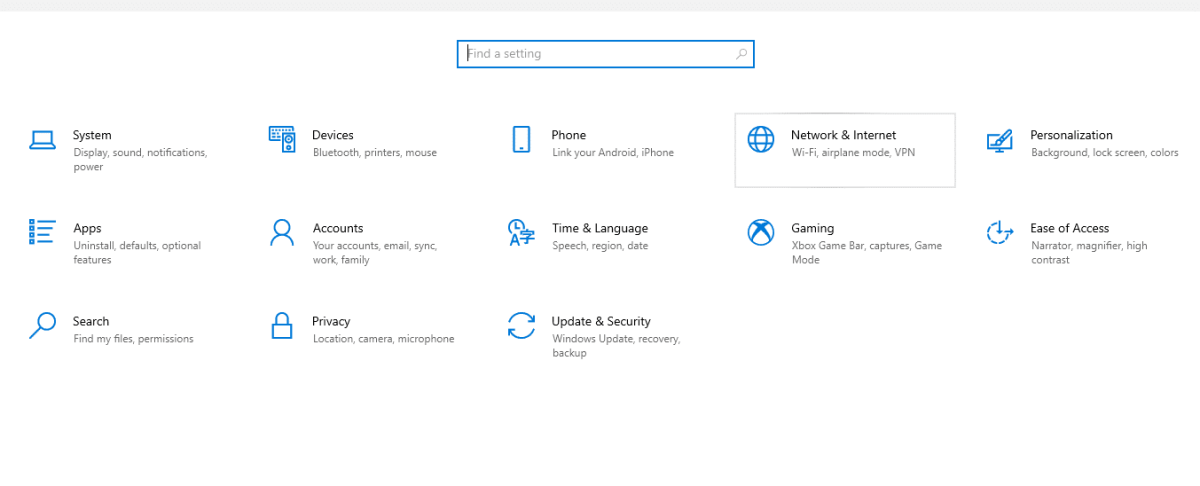
Step 3: From the display setting menu, in the left side panel, click on proxy

Step 4: From the display proxy setup, you can see the default settings of your system proxy. You can either switch it on via the setup script, add the script address, then save. Or you can manually set the proxy up.

Step 5: To use the manual settings, click on use a proxy server. Also, click on Don’t use the proxy server on local (intranet) addresses. So that it won’t route via the proxy if you want to have access to local files.

Step 6: Now, purchase or input the address details gotten from your proxy provider. Then click Save.
Second Steps
This is yet another way a window users can check for the default proxy firewall settings.
Step 1: Go to control panel from the start menu. Or search for it from the search bar

Step 2: From the top right-side search for Internet option

Step 3: From the Internet option display dialogue box, click on Connection.

Step 4: Click on the LAN settings. Tick on the box settings you preferred. Then,

Step 5: Click Save
How to Setup Proxy Firewall in MacOS
As an enthusiast of MacOS, below is how you go about setting the proxy firewall default
Step 1: From the desktop, choose the Apple logo at the top left of your system
Step 2: Choose System Preferences
Step 3: On the display system preference, click on the network icon. Then, click on the Ethernet or Wi-Fi connection.

Step 4: Click on Advance from the left bottom
Step 5: From the displayed, click on Proxies from the top. Then,
Step 6: Select any Proxy type of your choice. Or simply select Web Proxy (HTTP) and enter the Web Proxy Server address and port number. If authentication is required, simply type in your username and password.
Step 7: Go to Secure Web Proxy and tick the box. On the right-hand side, type in the proxy address and port number as well.

Step 8: Click on proxy server requires authentication and input your username and password again.
Step 9: Click on Okay and Apply. The close System Preference page.
There you have it, that’s how to go about checking your proxy firewall default and setting up one on your Windows or Mac system.
FAQs
Q. What are the Two Most Common Forms of Proxy Firewalls?
There are several types of proxy firewalls. But the most commonly used is HTTP and SOCKS proxy firewall. In any proxy setup, HTTP and SOCKS are majorly used. Socks are quite diverse. While HTTP has HTTPS, Socks has socks4 and socks5. These two Proxy firewalls are mostly used when talking about proxy firewall because it is very secure compared to others. And network security is one of the core priorities why this proxy type is highly used and recommended. So, if you want to set up a proxy firewall, HTTP and SOCKS are usually used because of their capability.
Q. What is Another Name for Proxy Firewall?
Another name for a proxy firewall is Application Firewall or Gateway Firewall. Users and administrators identify it by any of the names because it has both the functionalities of a proxy and a firewall. It is called an application firewall because it analyzes, organizes, and filters network resources like messages and communication at the application layer. And it is also called a gateway firewall because it functions as a proxy to serve as an intermediary between you and the network to which you want to have access.
Q. Is a Proxy Firewall the same as a Proxy Server?
A proxy firewall is often called a proxy server. This is because a proxy firewall serves both the purpose of a proxy server and a firewall. But to answer your question, no, a proxy firewall is not the same as a proxy server. Though it serves as a proxy server. What’s different here is that all proxy server is a proxy firewall but not all proxy firewall is a proxy servers. This is so because I proxy firewall inspects and filters packets to get the unwanted messages out. This is not something a mere proxy server can do.
Q. Is Stateful Firewall the Same as Stateless Firewall?
A stateful and stateless proxy firewall performs similar functions but they are quite different in some aspects. Therefore, they are not completely the same. The core purpose of proxy firewall is to manage any traffic that comes in and out of it. A Stateful firewall maintains the active state of a network connection. Whenever a connection is initiated to the network, it tracks it and gives an update to the internal state, communicating that a new packet is being inspected currently. This enables a Stateful proxy firewall to identify quickly the validity and invalid state of packets coming in and out of the setup.
Whereas a Stateless proxy firewall is quite different as it does not maintain the internal state packets to packets, it assesses every packet by the data they contain. This in turn makes a Stateless proxy firewall inspect and filter every component in a packet. The IP address of the packet, incoming and outgoing connections, to know if it abides by the policy. And if otherwise, it blocks the packets. However, a Stateful proxy firewall inspects and filters packets based on the full content of the network connection. Whilst, a Stateless proxy firewall inspects and filters packets based on every specific packet.
Q. What is the Difference Between Traditional Proxy Firewall and Proxy Firewall?
Traditional proxy firewall cannot scrutinize or filter packets that pass through them. Also, they cannot decrypt and have no network security, so, every connection calls for an intrusion prevention system or antivirus to guard against cyber threats. However, a Proxy firewall does not work this way.
It has everything in place and did not need any third-party Intrusion Prevention System to work. It works standalone without the help of any antivirus. Inspects and detects, hen filters out unauthorized incoming and outgoing network messages within the setup. Privacy and anonymity are leveled up; hence, threats are easily spotted and viruses are denied entries. This is something the traditional proxy firewall cannot keep up with without the help of some support system.
Conclusion
Proxy firewall is a network security at an application layer. However, its major function includes inspecting, caching, protecting against network intrusion, making sure that only authorized users have access to the resources of a computer network, and also filters out unwanted packets, communication, and messages on an internet network. Connections are based on validity; therefore, it checks and verifies the network to know if the packets that are inbound and outbound follow the precise rules line or policy. If all lines are clear, it will allow the packet but if otherwise, it will block the packets.

